
Freescience

Surgera VR

The XR School › Science › Biology › Surgera VR
Free HealthCare VR Innovations Medical simulation PC VR • Vive • Rift
Released 4 March 2018 • Steam • Free • Step by step surgical procedure • Standing VR

Surgera VR

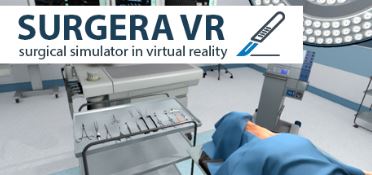
“Welcome to the operating room, doctor.” Surgera VR is a free surgical simulation that puts you at the operating table with a patient who needs an urgent procedure to restore their breathing. Each step is demonstrated, then you pick up the right instrument and perform it yourself. It is short and simple, but it is a free and genuinely hands‑on taste of what working in an operating theatre involves.

Developer: HealthCare VR Innovations, Inc.
Price: Free on Steam
Platform: PC VR via SteamVR
Subject: Medicine • Human biology • Careers
5.4
/10
XR School Score
Cautiously Recommended
Free • Guided instrument by instrument • Great careers taster • Only one procedure • Mixed user reviews • PC VR only
Mixed • Steam 51% positive of
143 user reviews
Overview

Surgera VR is an educational medical simulation from HealthCare VR Innovations, Inc., released free on Steam on 4 March 2018. You stand in a virtual operating room beside a patient who needs an urgent respiration recovery procedure, a surgical intervention to restore their ability to breathe. The patient has already been anaesthetised by local infiltration, so the scene begins at the point where the surgeon takes over.

The procedure is broken into a series of manipulations. For each one the simulation proposes the correct tool and action, and until you pick the tool up a demonstration animation plays out in front of you, showing what needs to happen. Selecting the instrument ends the demonstration and hands control to you. When you complete the action correctly, the on‑screen hint changes to confirm it, and you move on to the next step.

Watch, Then Do The demonstrate then perform structure is exactly how practical skills are taught in medical training: see the step, then carry it out yourself. Even in a simple simulation, physically reaching for an instrument and performing the motion is far more memorable than reading a list of steps, and the instant confirmation tells students straight away whether they got it right.
How a Session Works
🏥
1. Enter the theatre
Stand beside the anaesthetised patient in a virtual operating room. Standing room scale is required.
🎬
2. Watch the demonstration
An animation shows the next manipulation while the suggested instrument waits for you.
✂️
3. Take the instrument
Pick up the proposed tool with your motion controller and perform the action yourself.
✅
4. Confirm and continue
The hint changes when the step is done correctly, then the next manipulation begins.
Content Note for Younger Students This is a surgical simulation, so it shows a procedure being carried out on a patient. It is designed for education rather than shock, but some students may find surgery uncomfortable to watch. Talk students through what they will see first, and let anyone who prefers not to take part observe or skip it.
Surgera VR vs Full Surgical Simulators
Feature
Surgera VR
Professional simulators
Price
Free
Often paid or institutional licences
Procedures
One guided procedure
Libraries of procedures
Guidance
Demonstration plus hints
Scoring, assessment and feedback
Audience
Curious students and beginners
Medical trainees
Session length
Short
Long, structured courses

For a more detailed look at surgical robotics, see our review of the Surgical Robot Simulator, and for anatomy in depth try Human Anatomy VR.

Classroom Value
Careers inspiration
7.8
Value for money
9.0
Hands‑on interaction
6.0
Depth of content
3.0
Polish and reliability
4.0
Strengths and Limitations
Strengths
  • Completely free
  • Clear demonstrate then perform structure
  • Instant confirmation of each correct step
  • Real sense of standing at the operating table
  • Tiny download (400 MB)
  • Runs on older gaming PCs
Considerations
  • Only one procedure to practise
  • Mixed reviews: 51% positive of 143
  • Released in 2018 with few updates since
  • PC VR only (designed for Vive and Rift)
  • Needs standing room in front of the PC
  • English only
  • Surgical content may unsettle some students
For Teachers: A Careers Taster, Not a Course Surgera VR works best for sixth formers and older GCSE students thinking about medicine, nursing, paramedic science or other healthcare careers. Pair it with a lesson on the respiratory system (GCSE Biology gas exchange and the breathing system) and discuss why surgeons rehearse every step before operating. Because it is free, it costs nothing to try on an existing PC VR setup, but expect a short session of around ten to fifteen minutes per student rather than a full lesson.
Free
Steam • PC VR via SteamVR • HTC Vive or Oculus Rift
Get on Steam → More biology apps →
Quick Facts
Developer
HealthCare VR Innovations, Inc.
Released
4 March 2018
Price
Free (Steam)
Platform
PC VR via SteamVR • HTC Vive or Oculus Rift
Play area
Standing only
Procedure
Urgent respiration recovery
Steam reviews
Mixed: 51% positive (143)
Language
English
Minimum PC
Intel Core i5‑4440 • 8 GB RAM • GeForce GTX 680
Storage
400 MB
Verdict
Surgera VR is a small, free and focused simulation that lets students step into an operating theatre and carry out a guided procedure for themselves. Its watch then do structure is sound teaching, and it makes a memorable careers taster for anyone curious about medicine. It is also limited: one procedure, dated visuals, PC VR only and a mixed reception from Steam users. Treat it as a free ten minute experience to spark interest, and look to fuller anatomy and surgical apps for deeper learning.

Gareth Griffiths

Gareth Griffiths is a scientist and the founder of World of Teaching, a free library of over 1,000 teacher made PowerPoints. He set up The XR School to help teachers, schools and parents find virtual and augmented reality apps that genuinely help young people learn, and to give an honest view of what each app teaches, which headsets it needs and what it costs.