
Geography

fly VR

Home Humanities Geography Fly VR
✈️
🌍
✈️ Geography · Flight · World Exploration · Google Earth · Meta Quest · Vision Pro
⭐ 4.4★ · 80+ five-star reviews · "Basically a Quest version of Google Earth — Absolutely sublime"

Fly VR

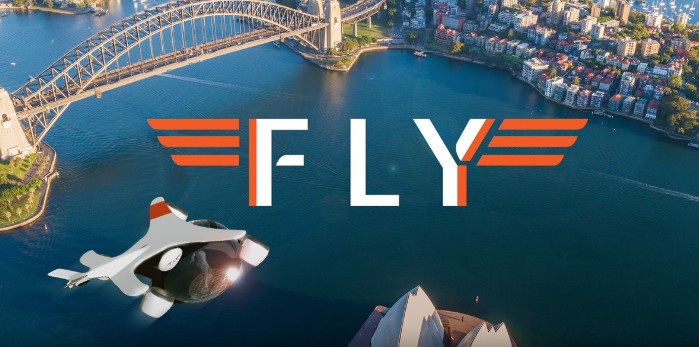
The closest thing to Google Earth VR on a standalone headset. Powered by Google's Photorealistic 3D Map Tiles API, Fly lets you soar anywhere on Earth — from ground level up through the atmosphere to the edge of space. Explore the Himalayas, Tokyo, Paris, or your own school from the air. Body-as-joystick or thumbstick controls, built-in streaming music, fast travel to iconic destinations, and multiplayer so you can explore with friends. From VirZOOM, originally created in collaboration with Google.

$9.99 Meta Quest 2/Pro/3 Apple Vision Pro VirZOOM Google 3D Tiles Multiplayer
Meta Store — $9.99
XR Rating
4.4
⭐⭐⭐⭐
Platform: Meta Quest 2/Pro/3 · Apple Vision Pro  ·  Price: $9.99 (Quest) · $14.99 (Vision Pro)  ·  Developer: VirZOOM  ·  Powered by: Google Photorealistic 3D Map Tiles API  ·  User rating: 4.4★ · 80+ five-star reviews
About the App

What is Fly VR?

Fly VR is the closest thing to the beloved Google Earth VR on a standalone headset — and for many Quest users, it's effectively the Google Earth VR experience they've been waiting for since that PC-only app launched in 2017. Developed by VirZOOM (a Boston-based company originally known for VR fitness cycling), Fly was originally created in direct collaboration with Google for a PC VR release in 2018 — but shelved when Google paused development of its Earth API. When Google announced the new Photorealistic 3D Map Tiles API, VirZOOM revived the project, rebuilt it for standalone headsets, and launched in 2024.

The app renders the entire planet in real time using Google's 3D Map Tiles — the same technology behind Google Earth's photorealistic terrain and building geometry. You can fly anywhere: hover above your school, cruise along the Thames, soar over Everest, zoom out to orbit and look back at the Earth from space. The world is rendered continuously as you move through it, with full 3D geometry in most major cities and landmark areas.

Why this matters for geography education: The original Google Earth VR was widely described as one of the most powerful geographical tools ever created — the experience of actually hovering above a place and looking down at it from altitude produces a spatial understanding that no map, satellite image or photograph on a flat screen can replicate. Fly brings that experience to the Quest, making it accessible to schools without a dedicated PC VR setup. Flying low over a river delta, a glacial valley or a volcanic island chain while discussing the physical processes that created it is a genuinely transformative geography lesson moment.

A user review that captures the experience well: "With the latest updates this got REALLY good. It's basically a Quest version of Google Earth where you can freely fly anywhere on the planet, go up into orbit, and experience the best vibes with the built-in streaming radio. Absolutely sublime." The 4.4★ rating across 80+ five-star reviews reflects a genuinely well-received app that has clearly improved meaningfully since its initial launch.

Features

What Does Fly Offer?

🌍
The Entire Planet — Rendered in Real Time
Google's Photorealistic 3D Tiles API provides full 3D terrain and building geometry across the planet. Most major cities and landmark areas have detailed 3D models — the Eiffel Tower, the Himalayas, the Grand Canyon, the Thames Estuary — all rendered continuously as you explore. Quality is lower than the PC VR Google Earth (which runs on much higher hardware), but for a standalone Quest headset the result is impressive and — critically for schools — available without a PC.
🕹️
Dual Locomotion — Body or Thumbstick
The default "body as a joystick" system places you inside a drone cockpit and steers based on where you lean — immersive but can become uncomfortable for longer sessions. Switching to thumbstick control in settings is recommended for classroom use and for seated students. The drone model can also be disabled for an unobstructed aerial view. Both modes are smooth and comfortable, with no reported motion sickness issues in standard use.
Fast Travel to Iconic Destinations
A curated list of popular destinations allows instant teleportation to landmark locations worldwide — no manual navigation required. For classroom use, this is invaluable: a teacher can jump the class directly to the Nile Delta, the Andes or the Ganges Plain without needing to navigate there from scratch. Custom coordinates can also be entered for specific locations relevant to the curriculum.
👥
Multiplayer — Explore with Friends
Multiple users can join the same flight session and explore together. For schools with multiple headsets, this enables a genuinely collaborative geography exploration — students can navigate to specific features and point them out to classmates sharing the same virtual airspace. A teacher demonstrating from one headset while students follow in another.
🎵
Built-in Streaming Music
A partnership with SkewSound and Feed.fm provides either a custom ambient soundtrack or streaming popular music while you fly. Users consistently praise this as adding significantly to the experience — transforming a geography tool into something that feels genuinely meditative and enjoyable as an extended exploration session.
⚙️
Customisation & Accessibility
Geographic overlays, points of interest, world detail level, motion input method and vehicle model are all adjustable. The accessibility-first design philosophy means most settings can be configured to suit different users — including seated play with thumbstick navigation, which makes it accessible for students with mobility considerations.
Fly vs Google Earth VR — How Do They Compare?
✈️ Fly VR ← this
Standalone Quest · $9.99
No PC required
Google 3D Tiles
Multiplayer
Music streaming
Lower visual quality
No Street View
🖥️ Google Earth VR
PC VR · Steam (Free)
Requires powerful PC
Higher visual quality
Street View supported
No multiplayer
Single player only
Discontinued updates
🌐 WorldLens VR
Quest 3 standalone
Google Earth 3D
8K Street View
AI guide MARA
Historical imagery
Higher quality
No open flight
Curriculum Fit

School & Curriculum Value

KS3–KS4 Geography
92%
Physical geography
95%
Human geography
80%
Enrichment / Wellbeing
88%
Engagement
90%
Ease of use
82%

Fly VR is one of the most versatile geography tools on Meta Quest. For physical geography, the ability to fly to any landform — river deltas, glacial valleys, volcanic archipelagos, desert dune fields, mountain ranges — and look at them from above while discussing the processes that created them is extraordinarily powerful. The aerial perspective is genuinely different from any map or satellite image on a flat screen; students understand scale and spatial relationships in a way that is difficult to achieve otherwise. For human geography, urban morphology, rural land use patterns, coastal development and transport infrastructure are all visible from the air in meaningful ways. Fast travel to curated destinations makes structured lesson use practical. Thumbstick mode and seated play make it accessible. At $9.99 per headset it is outstanding value for one of the most educationally flexible tools in the VR geography category.

XR School Verdict
Geographic scope10/10
Education value9/10
Engagement9/10
Visual quality (Quest)7/10
Ease of use8/10
Value for money10/10
Bottom line: The Google Earth VR experience that Quest users have been waiting for — and at $9.99 it's one of the best-value geography tools on the platform. Fly anywhere on Earth, from ground level to orbit, in real time using Google's 3D Tiles. Multiplayer, fast travel and thumbstick mode make it practical for classrooms. Visual quality is good but not exceptional on standalone Quest — Quest 3 looks best. An essential purchase for any school with geography in the curriculum.
⭐ What Users Say
"Basically a Quest version of Google Earth where you can freely fly anywhere on the planet, go up into orbit... Absolutely sublime."
"This app puts Google imagery to very good use. Soaring above the Earth is a stunning experience."
4.4★ combined rating · 80+ five-star reviews
Pros & Cons
✓ The entire planet — anywhere, any altitude
✓ Google 3D Tiles — photorealistic terrain
✓ No PC required — standalone Quest
✓ Multiplayer — explore together
✓ Fast travel to iconic destinations
✓ Thumbstick mode — seated play
✓ Built-in music — sublime atmosphere
✓ 4.4★ — consistently praised
✓ $9.99 — outstanding value
✗ Lower visual quality than PC VR Google Earth
✗ No Street View support
✗ Body-lean default can cause discomfort
✗ Needs internet connection for tile streaming
Quick Info
PlatformQuest 2/Pro/3 · Vision Pro
Price$9.99 (Quest)
DeveloperVirZOOM
Maps APIGoogle Photorealistic 3D Tiles
Multiplayer✓ Yes
ControlsBody-lean or thumbstick
Fast travel✓ Curated destinations
Street View✗ Not supported
Music✓ Streaming via Feed.fm
Best forGeography · KS3–KS4 · Enrichment
✈️
Get on Meta Store
Fly VR · $9.99
© The XR School · VR & AR Apps for Education