
art

Shapelab Max

Home Art Shapelab Max
🏺
✏️
🏺 Art · Design Technology · 3D Modelling · Meta Quest
🆕 Spring 2026 Update Live

Shapelab Max

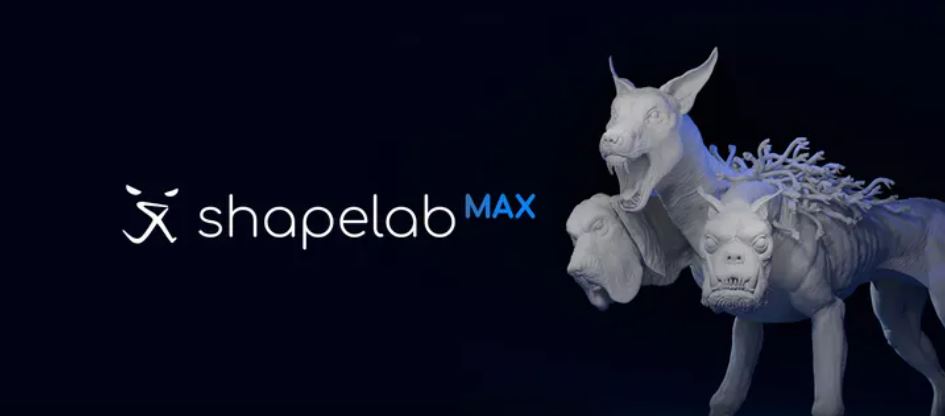
Professional-grade VR 3D sculpting on Meta Quest — no PC required. The first full-featured polygon and voxel modelling application for standalone headsets. Block out ideas in voxels, refine with production-ready polygon tools, then export to Blender, Unity or print in 3D.

Paid · Check store Quest 3 · 3S · Pro Leopoly Education discounts Steam: Very Positive
Meta Store shapelabvr.com
XR Rating
4.5
⭐⭐⭐⭐⭐
Platform: Meta Quest 3 · 3S · Pro  ·  Developer: Leopoly  ·  Steam: 82% Very Positive (278 reviews)  ·  Education discounts: Available
About the App

What is Shapelab Max?

Shapelab Max is the first full-featured professional 3D sculpting and modelling application for standalone Meta Quest headsets — developed by Leopoly, a Budapest-based software company with years of experience in VR creative tools. It runs natively on Quest 3, Quest 3S and Quest Pro with no PC required, bringing a workflow previously only possible on high-end workstations directly into untethered VR.

At its heart is a dual engine — combining polygon mesh sculpting (the foundation of professional 3D character and prop creation) with a voxel sketching system for rapid ideation. Block out an idea quickly in voxels, then switch to polygon tools for precision detail and production-ready topology. Export in FBX, OBJ, GLB or STL for use in Blender, Unity, Substance Painter, or direct 3D printing.

Why Shapelab in education? Professional 3D modelling is normally taught through desktop software like ZBrush, Maya or Blender. In VR, the experience is categorically different: you work at life size, rotating and inspecting your model from every angle with natural hand movements, and can literally put your head inside a mesh to inspect geometry. Students who have never produced anything in 3D before often find VR sculpting unlocks their creativity in a way flat-screen tools simply don't.

Shapelab offers an official education discount for institutions. Contact them via shapelabvr.com/education to apply. The PCVR version (Shapelab Max 2026) is available on Steam and the Leopoly website at a perpetual licence or annual subscription. The standalone Quest version (Shapelab Max) is available on the Meta Store.

Versions

Which Version Is Right for You?

🏺 Shapelab Max
Standalone Quest · this app
Full-featured sculpting on Quest 3/3S/Pro, no PC required. Dual polygon + voxel engine. Most features of the PCVR version. Best for school deployments using standalone headsets.
💻 Shapelab Max 2026
PCVR on Steam · ~$64.99
Full feature set including the latest additions. Runs tethered to a PC in VR or in desktop mode. Professional standard. Digital pen and tablet support.
✂️ Shapelab Lite
Quest 3/3S · $14.99
Core sculpting tools at a lower price. No voxel engine. Good starting point for younger students or introductory DT/Art projects. Early Access.
Features

What Can You Do With It?

🔷
Dual Engine Modelling
Voxel sketching for rapid blocking + polygon mesh for production detail. Switch between engines within the same workflow.
🖌️
Professional Brushes
Clay, Standard, Crease, Smooth, Pinch, Inflate, Snakehook, Flatten, Trim, Regularize, 3D Stamp — industry-standard set familiar from ZBrush.
🖨️
3D Print Ready
Export in STL for 3D printing. Voxel remeshing and hole-closing tools prepare models for print. Tangible results make the creative process feel real.
🔗
Pipeline Ready
Export FBX, OBJ, GLB, STL directly to Blender, Unity, Substance Painter, or other 3D applications. Fits into existing school creative pipelines.
Spring 2026 Update (just released)
World floating windows · Always-visible Document Outline in VR · Performance optimisations · Reference image packing (organise multiple images in the scene) · File browser improvements

Dynamic topology mode automatically adjusts mesh detail as you sculpt — tessellating or decimating polygons where you need more or less detail. This removes a major barrier for beginners: you don't need to manage polygon counts manually. Symmetry tools, multiresolution sculpting, vertex painting and alpha stamp textures are also included.

For Schools

Classroom Use

Shapelab has practical applications across Art & Design, Design Technology and Computing. The combination of sculpting tools, 3D printing export and professional pipeline integration makes it one of the few VR apps that produces genuinely useful artefacts — students can take a VR sculpture and print it physically, or import it into a game engine for a Computing or DT project.

🎨 Art & Design
Character design, creature sculpting, environmental concepts, digital clay. VR removes the "blank canvas" paralysis — students find it more intuitive than desktop tools.
⚙️ Design Technology
Product ideation, form-finding, 3D print preparation. Export to STL and print models directly — a complete digital-to-physical workflow in standalone VR.
💻 Computing / Games
Create game assets for Unity projects. FBX and GLB export integrates directly with game engine workflows taught at KS4 and A-Level Computing.
Education discount: Leopoly offers discounted pricing for educational institutions. Visit shapelabvr.com/education to enquire.
Reviews

What Are Users Saying?

S
Steam — Danny McGrath
3D artist · game art, hard-surface, organic sculpting
★★★★★

"Shapelab is a fantastic and feature-packed VR poly-sculpting solution. It has a very solid and stable foundation and the recent release brought some real quality of life and workflow improvements. If you love sculpting, but haven't experienced sculpting in VR, then I can't recommend Shapelab highly enough."

Source: shapelabvr.com testimonials
S
Steam user
Verified purchase · Steam (82% positive overall)
★★★★★

"I've become a VR convert now after trying out this sculpting program. It's very intuitive, easy-to-use and makes sculpting really fun! As I started to get the hang of it, I started to better appreciate just how much better it is to be able to see and manipulate the sculpt right there in front of you. It's like it's physically in front of you."

S
Steam user — indie game developer
Perpetual licence since 2024 · regular user
★★★★

"It's been a great all-around tool. I especially like the remeshing tools and mesh options — very helpful when creating game assets which is my primary use. I am an indie game dev and Shapelab is more than enough for my use. It's a good price also."

Source: Steam community
ℹ️ Shapelab Max Standalone (the Meta Quest version reviewed here) launched in late 2025. The PCVR version has 278 Steam reviews at 82% positive. The Spring 2026 update was released in April 2026.
Similar Apps

How Does It Compare?

Shapelab Max ← this
Paid
Polygon + voxel
3D printing export
Pipeline ready
Education discount
Open Brush
Free
3D painting / drawing
Immersive art
No mesh export
KS2–KS5
Gadgeteer
~$15
Physics/DT focus
No modelling
KS2–KS3
All ages
Shapelab Lite
$14.99
Core tools only
No voxel engine
Early Access
Good entry point
XR School Verdict
Creative value10/10
Engagement9/10
Ease of use7/10
Feature depth10/10
Value for money9/10
Bottom line: The most capable VR creative tool on Meta Quest. Professional-grade 3D sculpting without a PC — with 3D print and game engine export baked in. Transformative for Art, DT and Computing. The learning curve is real, but so is the creative ceiling. Education discounts available.
🎓 Education Discounts

Leopoly offers institutional pricing for schools and universities. Visit shapelabvr.com/education to enquire about class licences.

Pros & Cons
✓ First full-featured 3D modeller on standalone Quest
✓ Dual polygon + voxel engine
✓ 3D print export (STL) built in
✓ Export to Blender, Unity, Substance
✓ Industry-standard brush set
✓ Education discounts available
✓ 82% positive on Steam (278 reviews)
✓ Active development — Spring 2026 update
✗ Learning curve — not a beginner app
✗ Quest 3 / 3S / Pro only (not Quest 2)
✗ Performance drops at high polygon counts
✗ Not curriculum-specific — needs teacher framing
Quick Info
PlatformQuest 3 · 3S · Pro
PriceCheck Meta Store
PCVR price~$64.99 perpetual
DeveloperLeopoly
EnginePolygon + voxel (dual)
Export formatsFBX · OBJ · GLB · STL
SubjectArt · DT · Computing
Steam rating82% Very Positive
Edu discount✓ Available
Lighter versionShapelab Lite · $14.99
🏺
Get on Meta Store
Shapelab Max · Quest 3/3S/Pro
💻
Shapelab Max PCVR
Steam · ~$64.99 perpetual
© The XR School · VR & AR Apps for Education