
BiologyFree

NavigatorPro XR

Home Science Biology NavigatorPro XR
🫀
🔬
🫀 Medical · Anatomy · Clinical Training · 3D Imaging · Meta Quest 3
⚠️ Not for diagnosis — Visual support & training only

NavigatorPro XR

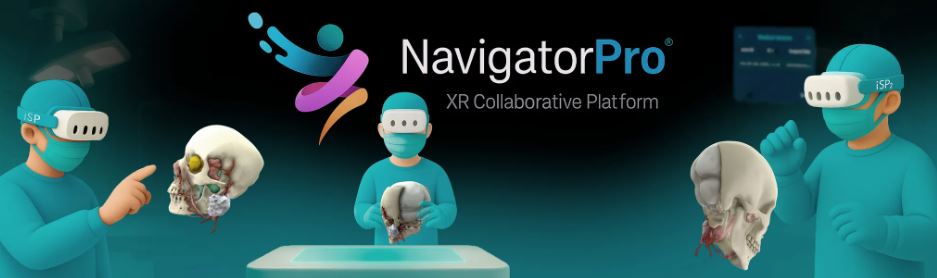
Visualise patient-specific 3D anatomy at true scale inside a Meta Quest 3 headset. Slice through anatomy with an interactive cutting plane, collaborate with an entire clinical team in the same shared case in real time, and use micro-gesture navigation to orient and analyse without disrupting the model's scale. Built for clinical teams, biomedical engineers and health education.

FREE Meta Quest 3 only Patient-specific 3D anatomy Real-time multiplayer Voice chat Interactive cutting plane
Get Free on Meta Store
⚠️ Important — Not a Diagnostic Tool

NavigatorPro XR is a professional viewer designed for visual support and training. It is not intended for diagnosis and does not replace clinical judgement. Schools and universities should use it as an educational visualisation tool only, not as a substitute for clinical assessment or decision-making. It is compatible with Meta Quest 3 only — it does not run on Quest 2, Quest 3S or Pro.

XR Rating
3.9
⭐⭐⭐⭐
Platform: Meta Quest 3 only  ·  Price: FREE  ·  Category: Medical · Clinical training · Health education  ·  Note: No independent user reviews found at time of writing
About the App

What is NavigatorPro XR?

NavigatorPro XR is a free medical visualisation platform for Meta Quest 3 that places patient-specific 3D anatomy at true scale inside a VR headset. Rather than looking at CT or MRI scan data on a flat screen, clinical teams, biomedical engineers and students can step into an immersive shared environment and examine anatomical structures at life size — rotating, slicing and inspecting them with natural hand gestures while communicating via built-in voice chat.

The app targets three overlapping audiences: clinical teams reviewing specific patient cases collaboratively before procedures, biomedical engineers evaluating device placement trajectories on anatomical models, and health educators using patient-specific anatomy to teach structure and pathology in a way that static diagrams cannot.

The core educational value: Medicine has always struggled to teach 3D anatomy from 2D sources. Textbook cross-sections, flat screen CT viewers and even cadavers present anatomy in ways that require significant spatial reasoning to translate into clinical understanding. NavigatorPro XR puts the structure in front of you at real scale — you can walk around it, see how structures relate to each other in space, and use the cutting plane to explore internal anatomy exactly as a surgeon would conceptualise it. That spatial comprehension is genuinely difficult to build any other way.

The platform is free to download on Meta Quest 3. It is listed under the Medical category on the Meta Store. There are currently no independent user reviews available on the store — this is a specialist professional tool with a niche audience, and we'd expect usage to be concentrated in clinical and biomedical engineering education settings rather than general VR gaming communities.

Features

What Does It Do?

🫀
Patient-Specific 3D Anatomy at True Scale
Visualise anatomical structures at their actual size in the physical world around you. Not a generic anatomical model — NavigatorPro XR is designed to display patient-specific data, making it a tool for real case review alongside general education. Scale is maintained during all interactions, including while using the cutting plane.
✂️
Interactive Cutting Plane
An interactive cutting plane moves along the perpendicular axis and rotates around its own axis — slicing through the anatomy to reveal internal structures without altering the model's scale. This lets educators expose cross-sections precisely, mimicking the conceptual approach surgeons use when planning procedures — and making it intuitive for students to understand how structures relate internally.
👆
Micro-Gesture Navigation
Navigation uses micro-gestures — taps and swipes — for smooth orientation and analysis. The interaction design is optimised for a professional setting where precision and speed matter: quick transitions between views without wrestling with cumbersome menus.
👥
Real-Time Shared Collaboration
Create shared rooms where an entire team views the same case in exactly the same state in real time. Crucially, anyone who joins later sees the same current state — not a snapshot from when the session started. Integrated voice chat allows discussion without needing external communication tools. All visibility toggles and changes are synchronised across every participant.
👁️
Structure Visibility Toggling
Toggle the visibility of individual anatomical structures and devices to focus attention on what matters for a given discussion. All changes synchronise across all participants simultaneously — so when a presenter hides or reveals a structure, the whole team sees it.
Curriculum Fit

Education Value & Curriculum Fit

A-Level Biology / Health
70%
University Medicine / Nursing
92%
Biomedical Engineering
90%
Clinical CPD / Team training
88%
Engagement
88%
Ease of use
74%

NavigatorPro XR is most powerfully suited to university-level medicine, nursing, physiotherapy, and biomedical engineering programmes — any course where spatial understanding of patient-specific anatomy is a core learning objective. The real-time collaborative room system makes it a natural fit for small-group anatomy teaching: a tutor loads a case, the whole group joins, and the tutor uses the cutting plane and visibility toggles to guide students through structural relationships. At A-Level, it is most relevant to Human Biology, Health and Social Care, and as enrichment for Biology students with an interest in medicine. It requires Quest 3 specifically — Quest 2 and 3S are not supported — which limits classroom deployment to institutions with Quest 3 hardware.

Alternatives

Other Medical & Anatomy VR Options

NavigatorPro ← this
Free
Patient-specific data
Real-time collaboration
Cutting plane
Quest 3 only
Human Anatomy VR
$39.99
Detailed atlas
Male & female
All Quest models
No patient data
MedicalHolodeck
Paid · subscription
DICOM + AI seg.
Dissection lab
Surgical training
Quest 3 + PC VR
Nanome v2
Free
Molecular level
Drug discovery
Protein structures
All Quest models

NavigatorPro XR occupies a specific niche: patient-specific 3D anatomy for real case review and clinical team education. If you need a general anatomy atlas, Human Anatomy VR is more accessible. If you need DICOM import, AI segmentation and surgical simulation, MedicalHolodeck goes much further. If your interest is at the molecular level, Nanome v2 is the right tool. NavigatorPro XR sits between the clinical professional tools and the educational anatomy apps — it's at its strongest when you have actual patient data and a team to review it with.

XR School Verdict
3D visualisation9/10
Collaboration9/10
Clinical/HE value9/10
Ease of use7/10
Breadth6/10
Value (it's free)10/10
Bottom line: A genuinely useful free tool for clinical education and biomedical engineering programmes — particularly powerful for small-group case review sessions where a tutor guides students through patient-specific 3D anatomy in a shared collaborative space. Not suitable for diagnosis. Quest 3 only limits deployment. For universities with the right hardware and curriculum fit, this is a compelling free addition to anatomy teaching.
⚠️ Clinical Notice

NavigatorPro XR is intended for visual support and training only. It is not designed for diagnosis and does not replace clinical judgement. Always comply with local and national medical regulations.

Pros & Cons
✓ Completely free
✓ Patient-specific 3D anatomy at true scale
✓ Interactive cutting plane — internal anatomy
✓ Real-time collaborative shared rooms
✓ Built-in voice chat
✓ Synced visibility toggling for all users
✓ Strong fit for medicine / biomedical HE
✗ Quest 3 only — no Quest 2/3S/Pro support
✗ Not for diagnosis — visual training only
✗ Very limited independent reviews/evidence
✗ Narrow audience — specialist use only
✗ General anatomy atlas not included
Quick Info
PlatformMeta Quest 3 only
PriceFREE
CategoryMedical
AudienceClinical · HE · Biomedical
Multiplayer✓ Shared rooms
Voice chat✓ Built-in
Cutting plane✓ Interactive
Diagnosis✗ Not for diagnosis
Best forMedicine · Nursing · Biomedical Eng.
🫀
Get Free on Meta Store
NavigatorPro XR · Quest 3 only
© The XR School · VR & AR Apps for Education