
Jigsaw typePuzzles

The Jigsaw Puzzle Garden

The XR SchoolPuzzlesJigsaws › The Jigsaw Puzzle Garden
VR 2016
Free / Bundle SteamVR only 🕌 Released 2016 Seated
Steam App 566580 • December 2016 • Classic early VR era

The Jigsaw
Puzzle Garden

A seated, basic VR jigsaw experience from December 2016 — the first jigsaw app listed on The XR School. Solve puzzles at a virtual garden table with adjustable piece count, internet radio, and support for up to 14 custom images.

Platform: SteamVR only (PCVR)
Released: December 2016
Price: Free or bundled (check Steam)
Format: Seated, puzzle on table
5.5
/10
XR School Score
Conditionally Recommended
An honest 2016 PCVR jigsaw: basic, functional, and historically significant as early VR — but significantly outclassed by newer alternatives
🕌 Oldest XR School Jigsaw December 2016 • SteamVR
First VR jigsaw listed on site
Overview

The Jigsaw Puzzle Garden was released in December 2016 on Steam, making it the earliest VR jigsaw puzzle game listed on The XR School by some years. It arrived in the period when the HTC Vive and Oculus Rift were brand-new consumer headsets and the catalogue of VR software was still establishing itself. As one of the first attempts to bring the classic jigsaw puzzle format into virtual reality, it holds a place as an early entry in the genre.

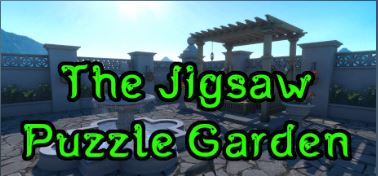
The experience is exactly what it describes: a seated experience in a pleasant garden setting, puzzle pieces laid out on a virtual table in front of you, solved with VR controllers. A slider adjusts piece count so the same image can be made easier or harder. While playing, you can tune into one of a number of internet radio stations. The game supports up to 14 custom images loaded from a folder in the game's root directory, in JPG format, ideally at 4K resolution or above, in a 2:1 aspect ratio.

Historical Context: 2016 Early VR Era When The Jigsaw Puzzle Garden was released, standalone VR headsets did not yet exist. The Meta Quest would not launch for another two and a half years. Developers were exploring what VR could do with everyday activities. A jigsaw puzzle at a garden table was a genuinely useful proof of concept: comfortable, low-motion, all ages, seated, accessible. By the standards of its era it was competent. By the standards of 2026, it has been comprehensively surpassed. It ships as part of a five-game bundle on Steam (with The Wire Loop Game VR, Punch Pad Workout, Backgammon Chess and Checkers, and Table Games VR), which reflects its modest scope.
What the Experience Offers
FeatureDetail
SettingVirtual garden environment. Seated at a table. Puzzle pieces spread on the table surface in front of you.
Piece countVariable slider. Range not specified in documentation; adjust from smaller to larger puzzles as needed.
Bundled imagesSeveral images included. Exact count not specified; described as "a number of images you can choose from."
Custom imagesUp to 14 JPG files placed in the game's Custom folder. Recommended 4K+ resolution. 2:1 aspect ratio required or images will be cropped.
AudioInternet radio stations available while puzzling.
PlatformSteamVR only. PCVR headset required. No Meta Quest version.
PriceFree or as part of a 5-game bundle on Steam. Check current Steam page for pricing.
Bundle includesThe Wire Loop Game VR, Punch Pad Workout, Backgammon Chess & Checkers, Table Games VR
Custom Image Setup

The Jigsaw Puzzle Garden supports custom images loaded from a folder in the game's installation directory. The setup process is more technical than newer alternatives and is worth understanding before classroom planning:

Technical Setup Requirements To add custom images: locate the game's root installation directory via Steam (right-click the game, Manage, Browse Local Files). Find the Custom folder within it. Add up to 14 JPG images to this folder. Images should be as high resolution as possible, preferably 4K width or above, and in a 2:1 aspect ratio (e.g. 4096x2048, 3840x1920). Images that are not 2:1 will be cropped. The game does not accept PNG, only JPG. This is more involved than the URL-based import of Jigsaw Puzzle VR (Quest) or the Flickr-based workflow of Jigsaw 360, and requires PC file access before a session.
Practical Note for Teachers For classroom use on a PC VR setup, custom images must be prepared and loaded before the session. This is manageable but adds a setup step. Once loaded, students select from available images within the app. Because the Custom folder takes up to 14 images, you could prepare a curated subject-specific set once and leave it for repeated use across sessions.
How It Compares in This Jigsaw Batch

Placed alongside the other VR jigsaws reviewed on this site, The Jigsaw Puzzle Garden's relative standing is honest:

XR School Jigsaw Reviews: Score Summary
Jigsaw 360
8.0
Spherical inside-the-scene, full accessibility, $4.99
Animal Jigsaw VR
7.2
Multi-platform, animal facts, creature collector
Jigsaw Puzzle VR
7.0
Any image procedural, gravity toggle, solo indie
Oasis Puzzles
7.5
Multiplayer, hand tracking, 9 languages
Puzzle Cafe VR
5.0
Cafe setting, Steam stalled, check Quest version
The Jigsaw Puzzle Garden
5.5
2016 classic, basic, PCVR only, bundled

The score of 5.5 reflects a completed, functional application that does what it says — not an abandoned or broken one. The honest limitation is age and scope. If a school has only SteamVR-capable PCs and no Meta Quest headsets, and is looking for the simplest possible entry-level jigsaw experience, The Jigsaw Puzzle Garden remains usable. For any school with Meta Quest headsets, Jigsaw 360 is the better choice in every respect.

Curriculum Fit
Spatial reasoning
5.8
Custom image potential
5.5
Ease of setup
4.8
All ages suitability
8.2
Mindfulness / comfort
7.5
Modernity vs alternatives
2.8
Strengths and Limitations
Strengths
  • Free or bundled at very low cost on Steam
  • Completed and functional — not abandoned, just basic
  • Custom image support (14 JPGs) allows curriculum-specific use
  • Variable piece count slider suits different ages and abilities
  • Internet radio adds pleasant atmosphere during solving
  • Comfortable, seated, low-motion — suitable for VR novices
  • Historical interest as one of the earliest VR jigsaw releases
  • Considerations
    • SteamVR PCVR only — no Meta Quest standalone version
    • 2016 visuals and production values show their age clearly
    • Custom images require PC file access and pre-session preparation
    • JPG only, 2:1 ratio required — more restrictive than newer apps
    • Significantly outclassed by Jigsaw 360 in every category
    • No accessibility suite, hand tracking, auto-save, or multiplayer
    Free / Bundle
    SteamVR • PCVR only • December 2016
    View on Steam →
    Part of a 5-game Steam bundle including The Wire Loop Game VR, Punch Pad Workout, Backgammon Chess & Checkers, and Table Games VR.
    Quick Facts
    Platform
    SteamVR (PCVR only)
    Released
    December 2016
    Price
    Free or part of 5-game bundle
    Format
    Seated, puzzle on table
    Custom images
    Up to 14 JPG, 4K+, 2:1 ratio
    Audio
    Internet radio stations
    Piece count
    Variable slider
    Bundle
    5-game Steam bundle
    Age Rating
    Everyone
    No Quest version
    PCVR only
    Verdict
    An honest, complete, and very basic VR jigsaw from 2016. It was one of the first of its kind and it worked: comfortable, seated, all ages, with custom image support. Nearly a decade later it is outpaced in every dimension by Jigsaw 360, Jigsaw Puzzle VR, and others. If your school has only SteamVR-capable PCs and no Quest headsets, and needs the simplest possible jigsaw app at minimal cost, The Jigsaw Puzzle Garden is usable. For any school with Meta Quest, there are better options. Worth listing for completeness and historical context; worth noting with candour that the category has moved on considerably since 2016.