🔬 Free · University-Level Vector Calculus · Built by UCSD Mathematicians · Open Source
CalcFlow is free on Meta Quest, Steam and Apple Vision Pro — with zero cost and no sign-up required. It was developed in 2016 at the University of California San Diego (UCSD) with grant funding from mathematics professors Dr. John Eggers and Dr. Jeff Remmel, and is used by scientists, engineers and educators worldwide. The source code is open on GitHub (matryx/calcflow). This is not a children's maths game — CalcFlow targets university-level and A-level Further Mathematics content: vector calculus, double integrals, parametric surfaces and spherical coordinates. It is the most mathematically advanced free VR tool on the Quest platform.
Platform: Meta Quest · Steam · Apple Vision Pro ·
Price: FREE ·
Developer: Nanome Inc. (UCSD origin) ·
Level: A-level FM / University
About the App
What is CalcFlow?
CalcFlow is a free VR mathematical visualisation tool developed by Nanome Inc. — originally a spin-out project from the University of California San Diego funded by a mathematics education grant in 2016. It was among the first serious mathematical VR tools ever released, predating most competitors by years, and remains one of the most capable free options available. The source code is fully open on GitHub under the matryx organisation.
CalcFlow's focus is vector calculus — the branch of mathematics dealing with vectors, vector fields, line integrals, surface integrals and the theorems that connect them (Stokes', Green's, Divergence). These topics sit at the heart of university mathematics, physics and engineering degrees and represent some of the most persistently difficult concepts for students to visualise from two-dimensional diagrams. CalcFlow moves them into three-dimensional space where students can physically interact with vectors, watch field lines flow, and feel the geometry of objects that textbooks can only hint at.
From Nanome's blog: "Calcflow brought tools to dive into vector calculus: you could plot two-variable functions and see the geometric interpretation of double integrals; you could plot 3D vector fields and examine flow lines; and the hallmark tool, you could plot parametrised surfaces and gain intuition behind the concept of a '2-variable input, 3-variable output' function."
In 2024 Nanome launched Calcflow Vision on the Apple Vision Pro — currently plotting z=f(x,y) functions with full parity to the Quest/Steam version in development. CalcFlow has been used in the HTC Vive Libraries programme to bring free STEM VR to public libraries across California and Nevada. Nanome's other products include Nanome itself — an enterprise XR drug discovery and molecular visualisation platform used by pharmaceutical companies and universities worldwide.
Features
What's Inside
➡️
Vector Addition & Cross Product — Manipulate with Your Hands
Grab vectors directly with your Quest controllers and physically move them through 3D space. As you reposition one vector, the cross product updates in real time — its direction and magnitude changing fluidly as the angle between the two vectors shifts. This direct physical manipulation of vector relationships is something impossible on any flat screen: the right-hand rule becomes physically embodied, the perpendicularity of the cross product is viscerally obvious rather than abstractly stated. For A-level Further Mathematics or university Physics students studying vectors and torque, this single feature alone makes CalcFlow worth downloading.
∫∫
Double Integrals — See and Feel the Volume Under a Surface
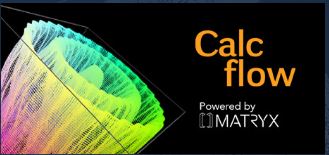
CalcFlow renders double integrals as three-dimensional volumes — the area under a sinusoidal graph becomes a physical object you can walk around, look beneath, and appreciate as a volume in space. The geometric interpretation of ∬f(x,y)dA — the signed volume between a surface and the xy-plane — is one of the most consistently misunderstood concepts in multivariable calculus. Seeing it rendered at full scale, with the surface above and the volume below, makes the relationship between the integral notation and the geometric reality immediate and intuitive in a way that no 2D cross-section diagram can achieve.
🌀
Möbius Strip, Spherical Coordinates & Parametric Surfaces
Walk around and over a Möbius strip to confirm it has only one surface and one edge — an experience that makes topological properties physically obvious in a way reading about them cannot. Spherical coordinates — the (r, θ, φ) system essential for physics and engineering — are visualised as a three-dimensional coordinate frame that students can navigate. The parametric surface tool is CalcFlow's signature feature: define (x,y,z) as functions of two parameters u and v, and watch the resulting surface bloom into existence around you — from a sphere to a torus to a seashell helix. Edit parameters in real time and the surface morphs.
🌊
3D Vector Fields & Flow Lines
Plot three-dimensional vector fields — functions that assign a vector to every point in space — and trace the flow lines that follow the field's direction. Vector fields are fundamental to electromagnetism, fluid dynamics, gravitational theory and every area of mathematical physics. Students who struggle to interpret the 2D arrow diagrams that textbooks use to represent fields find the 3D immersive version transformative: standing inside a field and watching arrows rotate and flow around you communicates the structure of the field in a way no diagram can. Divergence, curl and flux all become spatially intuitive rather than symbolically opaque.
✏️
Custom Functions, Presets & In-VR Notes
Input your own parametric functions or vector fields using the in-VR input system, or explore from a library of preset examples and sample problems — useful for students who are new to the content and want guided starting points. Notes can be written in 2D or 3D within the VR environment by pressing the trackpad and drawing — supporting annotation, collaborative exploration, or simply jotting the equation you've just visualised. The interface is designed for scientists and engineers as much as students, with a clean, functional aesthetic rather than a gamified wrapper.
School Value
Curriculum & Educational Fit
University calculus / physics96%
Value for money (FREE)99%
Physics / engineering link88%
GCSE / standard A-level28%
Guided lessons / structure25%
CalcFlow is the most mathematically advanced free VR tool available on Meta Quest and occupies a curriculum position that very few other VR apps reach: university-level mathematics. Its content — vector calculus, double integrals, parametric surfaces, vector fields — sits at the heart of undergraduate Mathematics, Physics and Engineering degrees. For sixth-form students studying A-level Further Mathematics, CalcFlow covers content from the Further Pure Mathematics units (vectors, matrices, complex numbers) and from the Mechanics options (vector fields and their physical interpretations).
The most powerful educational application is for concepts that students consistently struggle to visualise from textbook diagrams. The cross product — students learn the right-hand rule mechanically but rarely feel why the resulting vector is perpendicular; in CalcFlow, this is physically obvious. Double integrals as volumes — the geometric interpretation of ∬f(x,y)dA is notoriously abstract; in CalcFlow, you stand inside the volume. Vector fields — the arrow diagrams in textbooks give only a local snapshot; in CalcFlow, you stand inside the field and see its global structure. Parametric surfaces — the concept of a "2-variable input, 3-variable output" function is one of the most conceptually challenging in multivariate calculus; in CalcFlow, you watch the surface form and can edit parameters to understand how each controls the shape.
For A-level Physics, electromagnetic field visualisation (vector fields representing E and B), spherical coordinate systems (used in quantum mechanics wave functions), and the geometry of flux integrals are all relevant. For Engineering students, CalcFlow covers the mathematical foundations of continuum mechanics, fluid dynamics and electromagnetism. Below A-level Further Mathematics, the content is largely inaccessible — there is little at standard GCSE or A-level that maps onto CalcFlow's content.
Best use in school: A-level Further Mathematics — vectors, parametric equations, integration · University preparation (Year 13) · A-level Physics — electromagnetic fields, spherical coordinates · Engineering enrichment · University transition programme · Sixth-form Maths enrichment club · Teacher demonstration tool for 3D function visualisation.
XR School Verdict
Value for money (FREE)10/10
University maths fit9/10
A-level FM fit8/10
Physics / engineering link8/10
Guided lessons3/10
GCSE / standard A-level fit3/10
Bottom line: The most mathematically advanced free VR tool on Meta Quest — built by UCSD mathematicians and used by scientists and engineers worldwide. Free, open source, and available on Quest, Steam and Apple Vision Pro. Not appropriate below A-level Further Mathematics, and it has no guided lessons — it is a tool, not a tutor. But for sixth-formers and university students struggling to visualise vector calculus, it is genuinely irreplaceable. Nothing else on the platform touches this level of content for free.
Pros & Cons
✓ Completely FREE
✓ University-level vector calculus content
✓ Hands-on vector manipulation
✓ Double integrals as 3D volumes
✓ Parametric surface builder
✓ 3D vector fields + flow lines
✓ Möbius strip · spherical coordinates
✓ In-VR notes (2D and 3D)
✓ Open source (GitHub)
✓ Quest · Steam · Apple Vision Pro
✓ Built by research mathematicians
✓ Used by scientists & engineers globally
✗ Not appropriate below A-level FM
✗ No guided lessons or structured curriculum
✗ Older codebase — limited recent updates
✗ Tool not game — no engagement mechanics
Quick Info
| Platform | Quest · Steam · Apple Vision Pro |
| Price | FREE |
| Developer | Nanome Inc. (UCSD) |
| Origin | 2016 · UCSD grant-funded |
| Open source | ✓ GitHub: matryx/calcflow |
| Vectors | ✓ Add · cross product · fields |
| Integrals | ✓ Double integral visualisation |
| Parametric | ✓ Custom surface builder |
| Topology | Möbius strip + normals |
| Coords | Spherical coordinates |
| Best for | A-level FM · University · Physics |
∇ Content Covered
➡️ Vector addition (hands-on)
✖️ Cross product (real-time)
∫∫ Double integral (3D volume)
🌀 Möbius strip + normal vector
🌐 Spherical coordinate system
🌊 3D vector fields + flow lines
📐 Parametric surfaces (u,v → xyz)
📊 Two-variable function surfaces
✏️ In-VR notes (2D and 3D)
∫ CalcFlow vs CalcVR
CalcFlow (this) — FREE · sandbox tool · hands-on manipulation · no lessons · open source · vectors + integrals + parametric.
CalcVR — paid · 50+ guided lessons · structured curriculum · 3D coordinates to line integrals · teacher-friendly · more educational scaffolding.
Both are excellent for university-level maths. CalcFlow for open exploration; CalcVR for guided learning with lessons.
∇
Get Free on Meta Store
CalcFlow · Free forever · Open source